Free this monthWith every Drivewatch dashcam, the invisible one too. A first in the Netherlands.
Someone too close to your car?
You see exactly who.
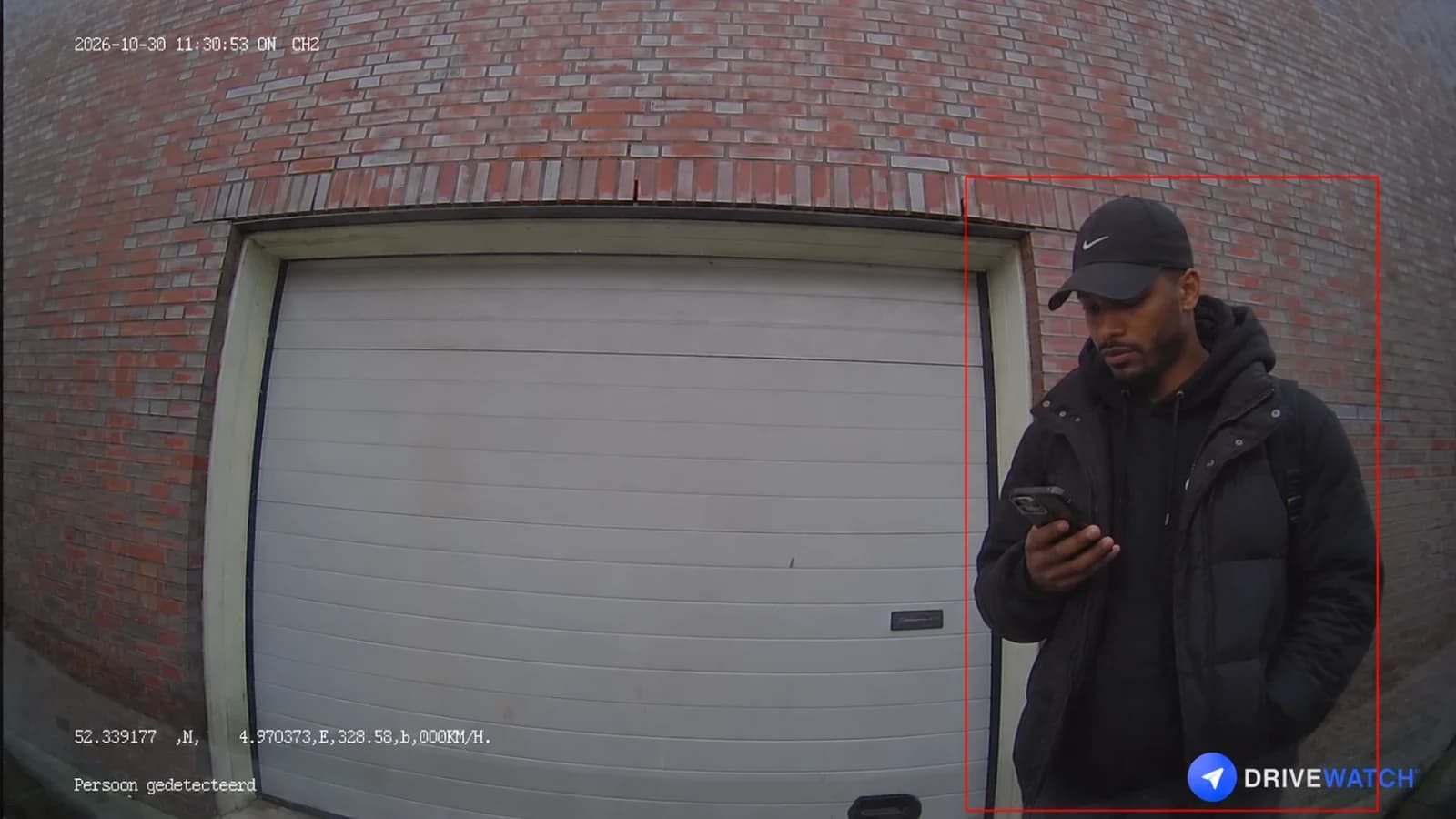
Dashcams with motion detection react to anything that moves and only start filming when it is too late. Our camera recognises people, with our own AI model on a chip in the camera. If someone comes too close to your car, you get sharp photos on your phone.
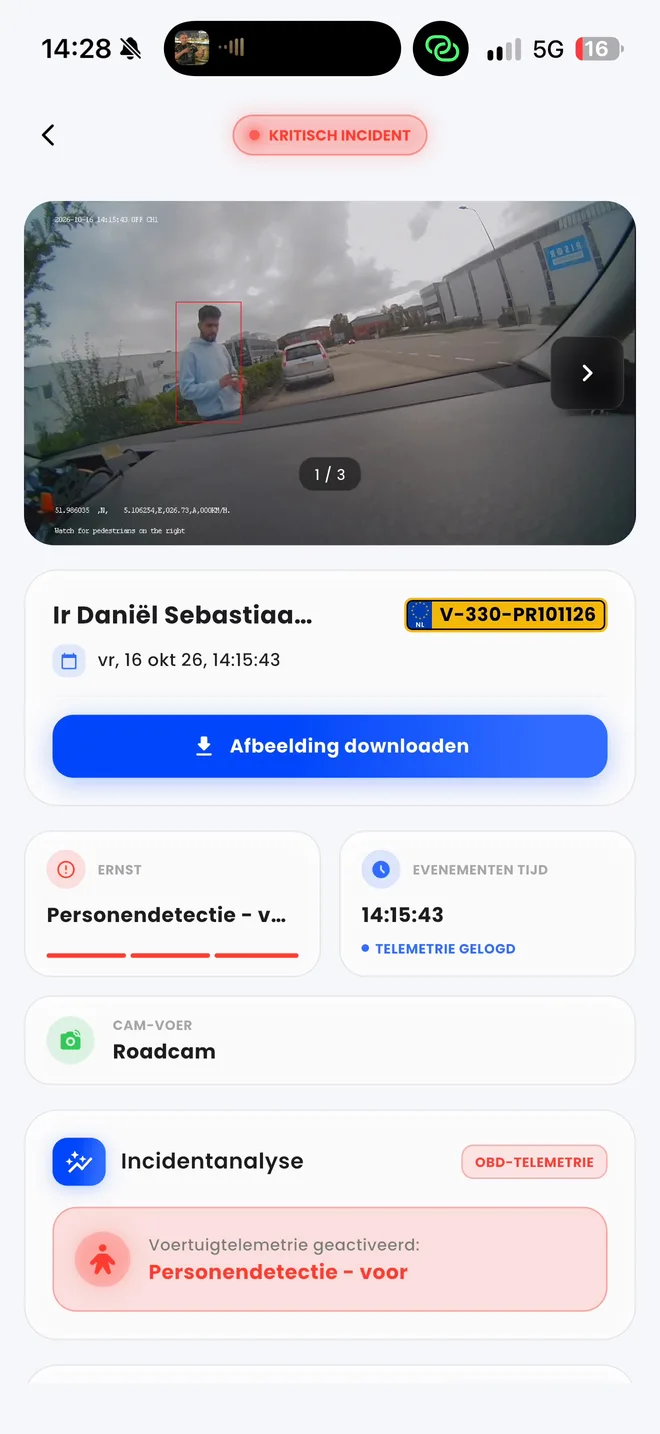
- 1.5 TOPS
- AI chip in the camera
- Only people
- No alerts for cats or cars
- Up to 30 hours
- Awake after parking, with the Accupack
- Free
- This month, with every Drivewatch dashcam
Motion detection is
always too late.
A dashcam with motion detection sleeps while your car is parked. Only when something moves does it wake up, and then it has to start up. By the time it films, the person who woke it has already gone.
Motion detection
Recording starts once the person has gone. You see an empty street, or someone's back.
Drivewatch person detection
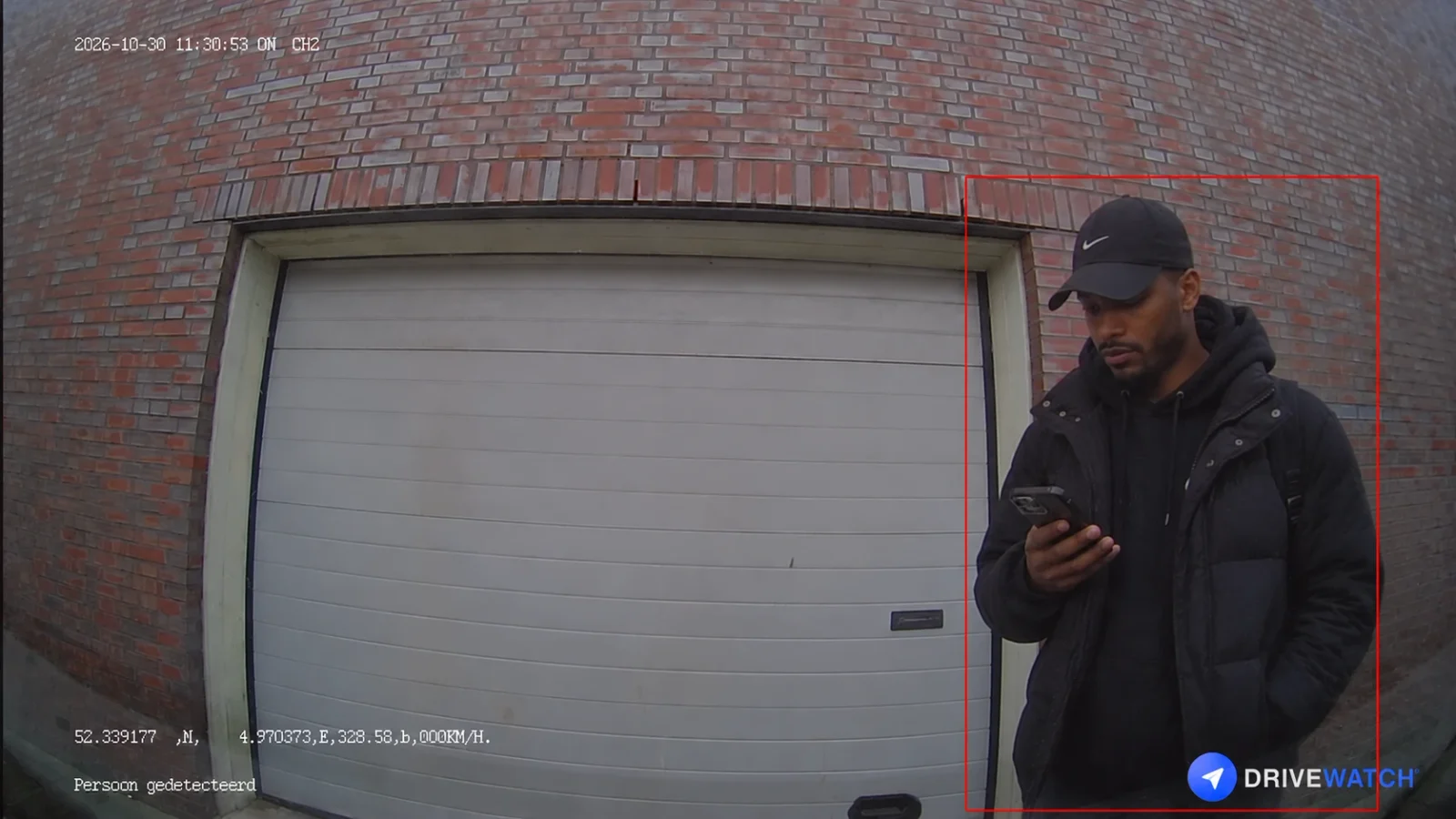
The camera was already awake. It takes 3 photos while the person stands at your car, and you get an alert straight away.
A cat is not a burglar.
Our camera knows that.
Motion detection only sees that something changes in the picture. A cat, a passing car, headlights or branches in the wind: every one an alert. After a few days you switch them off, and then you miss the one alert that matters.
Motion detection
9 alerts- Motion detectedWas: a passing car
- Motion detectedWas: a cyclist in the street
- Motion detectedWas: a moving shadow
- Motion detectedWas: a cat
- Motion detectedWas: a passing car
- Motion detectedWas: branches in the wind
- Motion detectedWas: a cat
- Motion detectedWas: someone at your car
- Motion detectedWas: a passing car
Drivewatch person detection
1 alert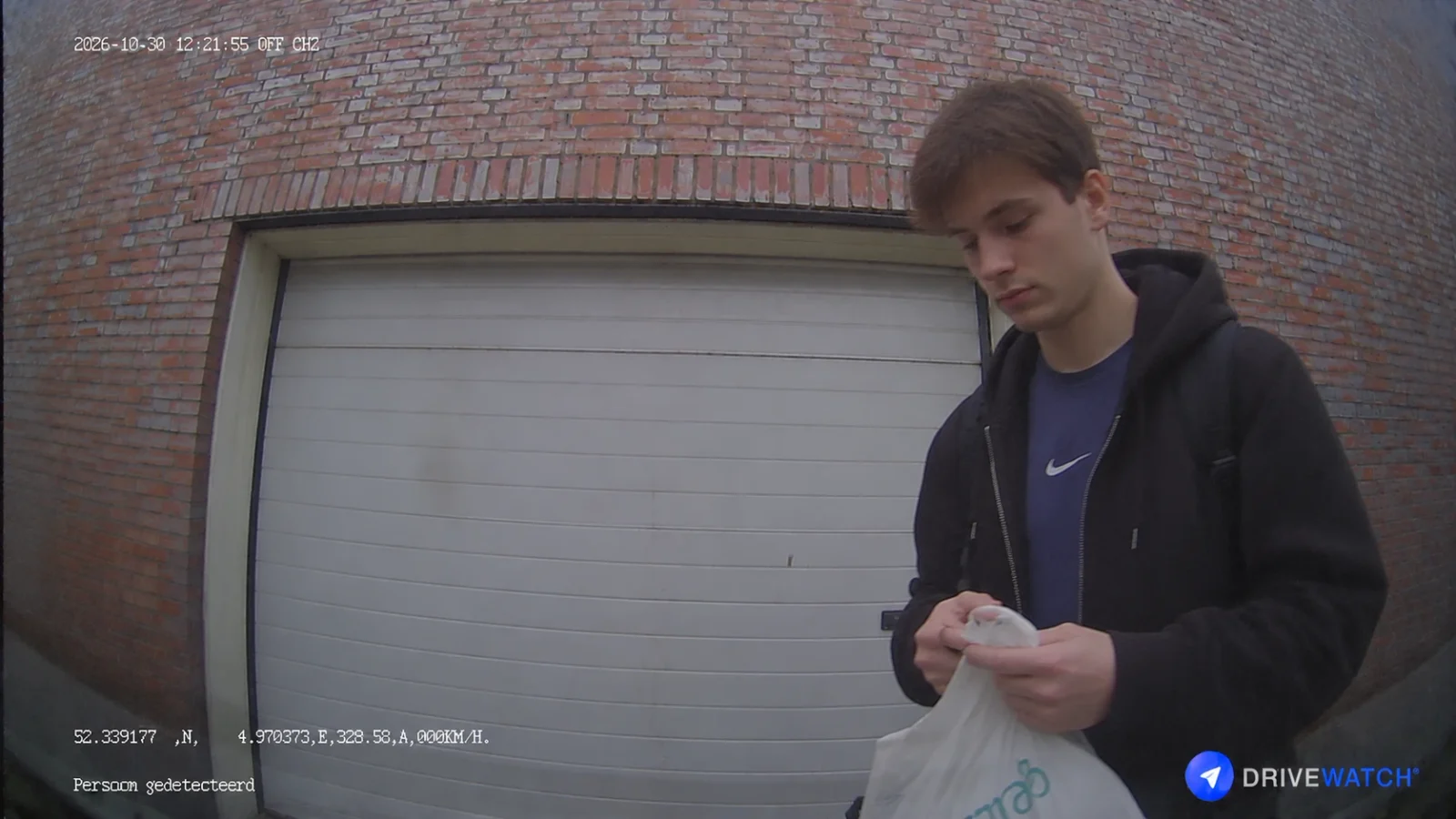
A real picture from the app, unedited
The rest of the morning: nothing. Nobody else came too close to your car.
An example of one morning in a street with traffic.
An AI chip in the camera.
Our own model on it.
Every Drivewatch dashcam carries a 1.5 TOPS AI chip (NPU). Our own AI model and our own firmware run on it. The recognition happens in the camera itself, frame by frame, not somewhere in the cloud.
Stays awake
While your car is parked, the camera keeps watching on little power. It never has to start up first. With the Accupack for up to 30 hours.
Looks at every frame
The chip examines every frame the camera sees, on the spot. No server is needed for it.
Recognises a person
Our model is trained on what people look like: head, shoulders, body and the way someone moves. A cat, a car, rain or a shadow is not a person and raises no alert.
Minds the distance
Someone walking past at a distance leaves the camera alone. If someone comes too close to your car, the camera captures them and an alert goes to your phone.
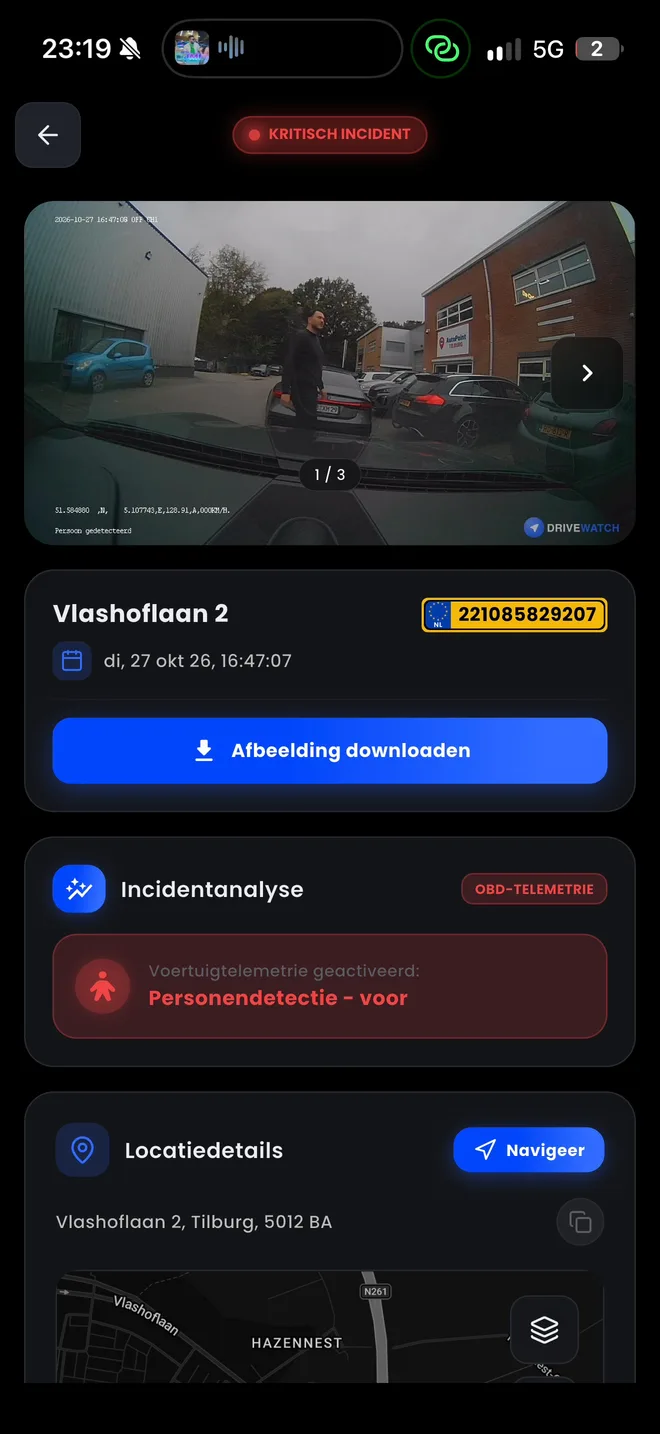
Sharp,
on your phone.
You know at once what is happening at your car, wherever you are. It is all in one alert in the Drivewatch app.
3 photos per detection
With every detection the camera takes 3 photos. That puts the person on several frames, even when they move fast.
From photo to video
Every photo carries its time to the second. See an interesting photo, and you can watch the whole video of that moment.
Exactly where
Every alert shows the address and the map. Tap Navigate to drive straight there.
Evidence in one tap
Download the photos and share them with the police or your insurer.
Motion detection or
person detection?
Two ways to guard your parked car. This is the difference.
| Topic | Motion detection | Drivewatch person detection |
|---|---|---|
| Reacts to | Any change in the picture | People only |
| Starts capturing | After starting up, often too late | At once, the camera is already watching |
| Cats, cars, branches | Every one an alert | No alert |
| Passers-by at a distance | An alert | No alert, only when someone comes too close |
| What you see | Often an empty street or someone's back | 3 sharp photos of the person |
| Recognition | None, it only sees movement | On the AI chip in the camera, with our own model |
| Alert on your phone | Not always, and often too many | One alert, with the photos and the video |
Know who
comes near your car.
Plan your installation. Person detection comes free this month, with the invisible dashcam too.
Plan your installation Ideal with the AccupackPerson detection works as long as the camera is awake. The Accupack keeps it on for up to 30 hours after parking, without draining your starter battery.More about the Accupack
Questions,
answered.
Person detection means the dashcam itself recognises whether a person is in the picture. At Drivewatch an AI chip in the camera does this, with our own AI model. If a person comes too close to your parked car, the camera takes 3 photos and you get an alert on your phone.
Motion detection reacts to any change in the picture and often has to start up first, so recording begins once the person has gone. Person detection reacts to people only, and the camera is already watching. You get fewer alerts and better pictures.
No. A cat, a passing car, rain or a shadow raises no alert. The camera only reacts when a person comes too close to your car.
No. Someone walking past at a distance raises no alert. Only when a person comes too close to your car does the camera capture them.
Yes. The camera keeps watching at night as well. If someone is at your car at three in the morning, you still get an alert with photos.
As long as the camera has power. With the Drivewatch Accupack it stays awake for up to 30 hours after parking, without draining your starter battery.
No. The recognition happens on the AI chip in the camera itself. Only the alert with the photos goes to your phone, encrypted.
Three. With every detection the camera takes 3 photos, so you have the person on several frames, even when they move fast. See an interesting photo, and its time takes you straight to the whole video of that moment.
Yes. You download the photos in the app with one tap and share them with the police or your insurer. Want to see more? Watch the whole video of that moment.
Nothing extra. Person detection comes free this month with every Drivewatch dashcam, the invisible dashcam included. That makes us the first in the Netherlands.
Plan an installation. We fit the Drivewatch dashcam in your car and set up the app on your phone.